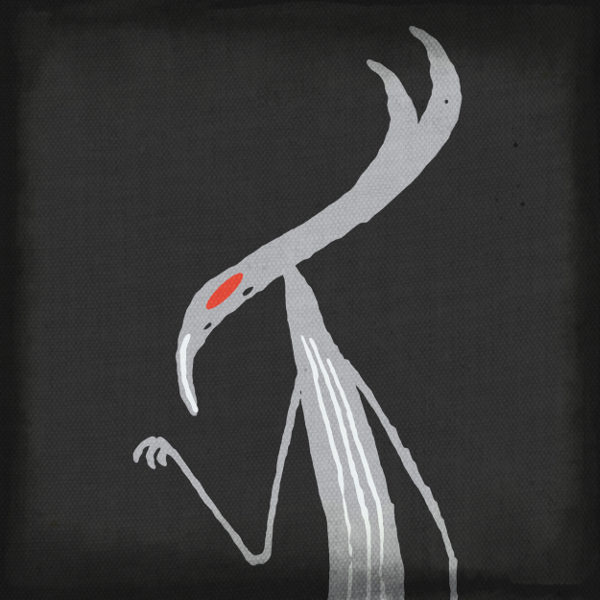
Little Fears: Vulture


There’s been a lot of blog posts on this usual non-bloggy website recently right? I certainly hope there’s not too many of them. If you feel your getting spammed by me, let me know in comments. Useful feedback is always appreciated.

This post goes back to the stuff I said I would post here four months ago and never did. As I have said in previous posts, I write six stories, draw six tiles and doodle one asset every working day. How many do you see? Barely a fraction makes it online. Mostly because I produce a lot of chaff (don’t we all), so I discard the worst. Some I save for a rainy day. Some I intend to give away to Patreons, both digital and physical copies. Some are for saleable artworks (see below).

I’ll confess, that’s just an excuse to show off some banging new product photography that’ll be arriving on my Threadless store soon.

Some of the pictures I doodle are intended to be drawn just for the sake of drawing them. Because I enjoy doodling them and would like to share them. Vulture is one such creature. I originally drew him in black and red. Then I saw Colour Collective were having a Timberwolf grey theme this week and DMStrachan’s Flickr group, Scribblers Cove, had a Second Life exhibition featuring whimsical art. A quick modification, decorate it a lil digitally and it would be rude not to join in right?

And hey, don’t be hating on him cause he looks a bit mean. Vultures provide a necessary environmental function. It’s not their fault there were at the back of the line when Creation was handing out good looks…

Some links for if you want to join in or nobble some of my wares.

Colour Collective: https://twitter.com/clr_collective
Scribblers Cover: https://www.flickr.com/groups/2958431@N25/
DMStrachan’s Blog: http://dmstrachan.co.uk/

Feas Threadless: https://littlefears.threadless.com/
Fears Patreon: https://www.patreon.com/littlefears

Cheers!
Creative Process – Doodling the Fears (Part 2)

I’m back! I got the missus and mutts up to her parents home. I now have an empty flat, mostly decorated, and soon to go up for sale. Trying to catch up with everyone in the blogosphere. Crikey, you guys, have been busy.

Next part of doodling the Little Fears. This time I want to give an outline of the individual illustrations I use for art prints, Threadless and logos.

I mentioned before I doodle six panels for stories and write six stories a day. For the stand alone illustrations, I doodle one to three a day, but I only aim to get one new character drawn per day.

I often draw a single character then scribble shapes around it. Recognize this lady?

I know almost nothing about what you are meant to do with digital art packages and proper art materials, so I stick to drawing with Posca paint pens and white paper. Regardless of what colours the characters end up, I try to stick to black, red and blue because they are easier for me to isolate on a computer.

I scan or photograph the doodles, get them onto my laptop when I isolate all the shapes and move them about until I am happy. I often soften the edges, but not so much they appear entirely smoothed. The texture is part of the appeal of my style, so I need to keep some lumps and bumps in there.

I use free software on my laptop, for those that are looking for a solid art package but cannot lay out the money for Photoshop try these.

Krita – Digital painting, creative freedom

Gimp – GNU Image Manipulation Program

Once on they look how I want them, I usually save them as PNG’s with transparent backgrounds. For the artists and designers, yes, I do know there are better file formats for me to use, but PNGs work for me.

I can then use these images for…

Book covers.

Art prints.

Logos.

Threadless T Shirts.

And YouTube and SkillShare videos.

Now there’s the magic. Not only can I draw from these images for future characters in the Little Fears, but six characters I have not posted here yet have an entire 90 tale story arc built around them. As I have been drawing one every day since January 2017, it also means I have a massive pool of characters to dip into when I want to introduce a new character to the Fears. Every character in the Little Fears was drawn on their own before being put into any of the tiles.

Some Skillshare course, not mine, for you to browse this week. Maybe something to inspire or teach you to create something awesome.

Learn GIMP by Brendon Schumacker.

GIMP is the free art package I use as a replacement for Photoshop. It’s a community run project has lots of free plugins and fancy brush packs on Deviant Art. This course is huge. About 6 hours long. It covers all the tools you need to know.

Cartooning Made Easy: Creating with Public Domain Comics by Angela Veals.

Angela is public domain and open source enthusiast. I took the course because it was a different way of creating comics. It turns out she’s GIMP user too.